Text to Handwriting Converter
Turn typed text into handwritten pages. Choose a font, adjust your paper and ink, and preview as you write.
Preview
How to convert typed text to handwriting
From a typed draft to a handwritten page, with the preview beside your editor at every step.
Start convertingAdd your text
Type directly in the editor, paste your notes, or import a supported document. Use headings, lists and page breaks to arrange the content. Check the formatting after importing.
Make the handwriting yours
Choose a handwriting font, lined or blank paper, and an ink color. Adjust font size, spacing and natural variation while watching the preview. Font coverage and some features depend on your selection and plan.
Preview and download your pages
Review each page before downloading. Sign in to export JPG, PNG or PDF, or bundle your pages in a ZIP. Available formats, quality and page allowances depend on your plan.
One text, different handwriting
Compare the same sample in two built-in fonts. These page excerpts are generated with the converter’s layout and rendering engine.
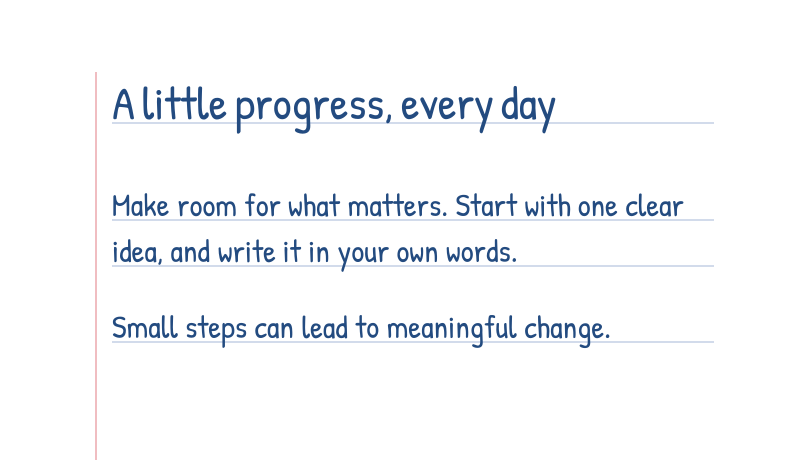
Patrick Hand on lined paper
A clear, upright style with blue ink and ruled lines for everyday notes.
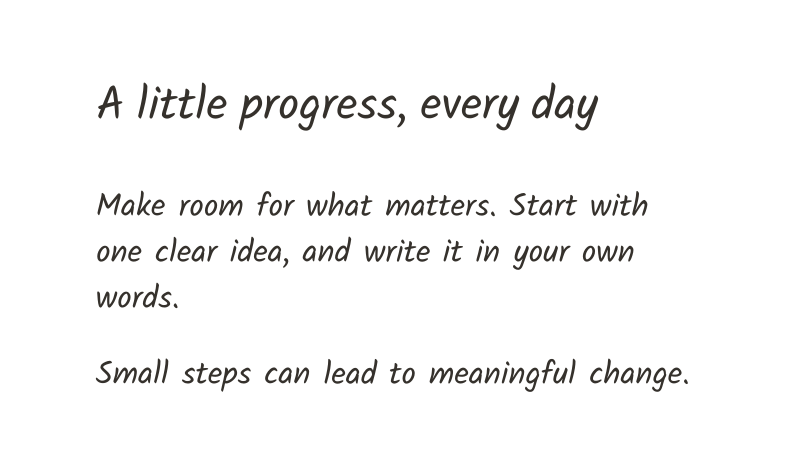
Kalam on blank paper
A more flowing style with dark ink and open space for letters and personal writing.
Control the page and the pen
Keep your words, then choose how they look on paper. The editor brings font, layout and handwriting controls together.
Built-in or personal fonts
Choose from 20 built-in handwriting fonts or a personal Font Studio project. Premium also supports font uploads. Character coverage depends on the font.
Paper and spacing
Use blank, lined or grid paper in different page sizes. Adjust text size, line spacing, word spacing and margins to suit the document.
Natural variation
Adjust letter position, stroke variation and ink color. Review the result as you make changes, from a neat note to a more expressive page.
Formats for sharing and printing
Download JPG on Free, or PNG and PDF with an eligible plan. Multi-page ZIP bundles and export quality follow your plan’s formats and page allowance.
Put your handwriting to use
Study notes
Turn your own summaries and revision notes into handwriting-style pages. Use headings and lists to keep the material easy to follow.
Personal letters
Give a typed letter or thank-you note a handwritten feel. Select a font and paper style that fit the message.
Creative projects
Create handwriting-style journal pages, short poems or printable inserts. Try different ink colors and spacing before exporting.
Frequently asked questions
Answers about free preview, downloads, personal fonts and where your documents are saved.
Compare plans and download limitsHow does text to handwriting conversion work?
The converter lays out your typed text using handwriting fonts and optional variation in letter position and strokes. It creates handwritten-looking pages rather than reading handwriting from a scan. OCR is a separate process.
Is the text to handwriting converter free?
You can edit and preview without signing in. New Free accounts receive a one-time allowance of five JPG download pages. Downloads require sign-in; PNG, PDF and higher export quality depend on an eligible plan.
Which formats can I download?
JPG is available on Free; PNG and PDF require eligible plans. ZIP bundles pages using formats allowed by your plan.
Can I upload my own font?
Yes. You can select an existing personal font from Font Studio. Uploading TTF, OTF, WOFF or WOFF2 files requires Premium. Font Studio and handwriting downloads have separate plans and allowances.
Where are my documents saved?
Cloud save starts on Starter; browser drafts remain local unless you choose cloud save.
Does this call an external AI?
Regular handwriting conversion does not need AI. Writing Assist is optional for eligible Premium accounts. When you submit text to it, that text is sent to the configured AI provider. The feature is unavailable when no provider is configured.
Use a font made from your handwriting
Want the page to look more like you? Create your own font in Font Studio, then select that project in this converter.
Draw your letters, refine their shapes and build a font in Font Studio. Font creation and document downloads use separate plans.
Read tutorials on creating fonts, working with handwritten letters and choosing tools for your project.