Calligraphr Alternative: HandFonty vs Calligraphr (2026)
Compare HandFonty and Calligraphr: browser drawing vs templates, free plans, pricing, ligatures and font ownership. Find the right handwriting font maker.
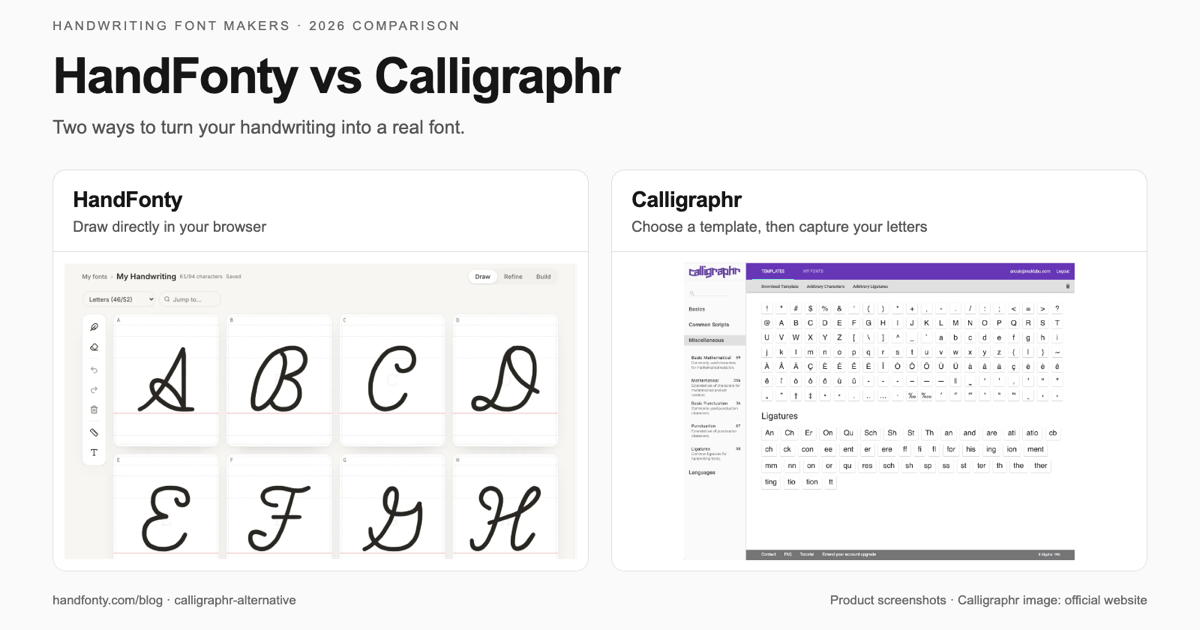
Quick answer: HandFonty is a Calligraphr alternative for people who want to draw handwriting directly in a browser, refine individual letters, and export an installable TTF or OTF font. Calligraphr is a strong choice for a template-based paper-and-pen workflow and supports more variants per character. Choose HandFonty for direct drawing and a permanent per-font Pro unlock; choose Calligraphr if capturing physical lettering or building a larger set of alternates matters most.
Last fact-checked: October 26, 2026. Written by the HandFonty team. This comparison draws on each product's official documentation and current pricing pages; it is not a controlled speed or output-quality benchmark.
What matters when choosing a Calligraphr alternative?
A handwriting font maker should fit the way you actually write. If you prefer ink on paper, capturing a completed template can be a good starting point. If you already write with a stylus, drawing inside a browser can remove the capture and upload steps.
The other decisions come later: how easily you can fix a letter, whether your font needs accents or connected letter combinations, and what you pay to keep editing.
This guide compares HandFonty and Calligraphr on those practical differences.
Jump to:
- Feature comparison
- Workflow comparison
- Spacing, variants and ligatures
- Free plans and paid pricing
- Which one should you choose?
- Frequently asked questions
- Sources
HandFonty vs Calligraphr: feature comparison
| What you are comparing | HandFonty | Calligraphr |
|---|---|---|
| Main input workflow | Draw each character directly in the browser | Fill a character template, then upload its image |
| Paper, printer or image capture | Not needed for direct drawing | The official beginner tutorial uses printing plus a scan or photo |
| Drawing tools | Mouse, finger or stylus; guided drawing cells | Physical pen in the standard template workflow; image editing after upload |
| Correcting a letter | Redraw it directly, then preview again | Edit the scanned character, or upload a replacement template |
| Individual character spacing | Per-character space before/after, position and scale | Per-character spacing is a Pro feature |
| Character variants | Up to 3 versions per character; Pro feature | Up to 2 on Free; up to 15 on Pro |
| Ligatures | Built-in and custom ligatures; Pro feature | Pro feature |
| Free font allowance | 1 handwriting font | Unlimited fonts over time; 1 active font at a time |
| Free character coverage | Letters, numbers and basic punctuation | Maximum 75 characters per font |
| Paid character coverage | Expanded character sets; check the template for the characters you need | Maximum 600 characters per font on Pro |
| Output formats | TTF and OTF | TTF and OTF |
| Commercial use | Pro Font or active Studio plan under current pricing terms | Permitted for user-created fonts, according to the official FAQ |
| Payment model | Permanent per-font unlocks, packs, or Studio subscription | Time-limited Pro upgrades, with one-time or recurring payment options |
| Downloaded fonts after paid access ends | Downloaded files keep working | Downloaded files keep working |
The main difference is how your letters get into the font maker. Both products produce standard font files and offer advanced typography features. HandFonty puts direct drawing at the start of the workflow; Calligraphr puts a character template and image upload there.
For the Calligraphr limits and payment model, see its official pricing page. For HandFonty's plan boundaries, see HandFonty pricing.
Two workflows: from handwriting to a font
How Calligraphr works
Calligraphr's first-font tutorial starts with a downloadable template:
- Select the characters you want to include.
- Download a PDF or PNG template.
- Print it and write in the cells with a black pen.
- Scan or photograph the sheet, keeping all four corner markers visible.
- Upload the template and add the detected characters.
- Edit the characters, build the font, preview it and download.
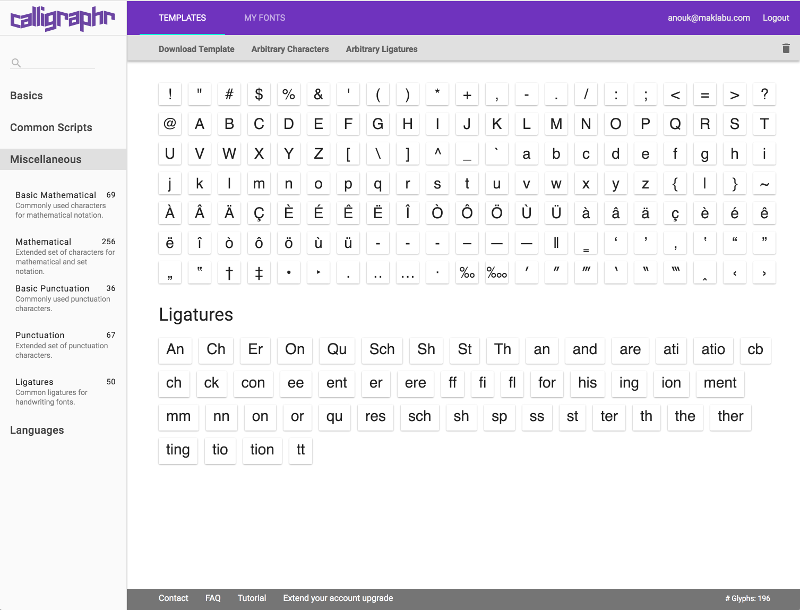
Calligraphr starts with selecting the characters for a template. Screenshot: Calligraphr's official website.
The paper route lets you begin with the physical writing tools you already like. A brush pen's shape, the angle of a nib and your natural hand movements can influence the letterforms captured in the scan.
You do not need a scanner specifically. Calligraphr's FAQ says modern smartphone cameras can give good results when the lighting is even and the corner markers are visible. It recommends 300–600 dpi for scans.
There is also an editing step after capture. Calligraphr can clean up character images and adjust their size and baseline. Its Pro plan adds individual character spacing. Replacing a letter does not mean recreating the whole font: you can upload a template containing the replacement characters.
How HandFonty works
HandFonty uses a direct Draw → Refine → Build workflow:
- Create your font and choose its character template.
- Draw each character in its guided cell with a mouse, finger or stylus.
- Refine its spacing, vertical position and scale.
- Preview a pangram or your own text.
- Build and download the font as TTF or OTF.
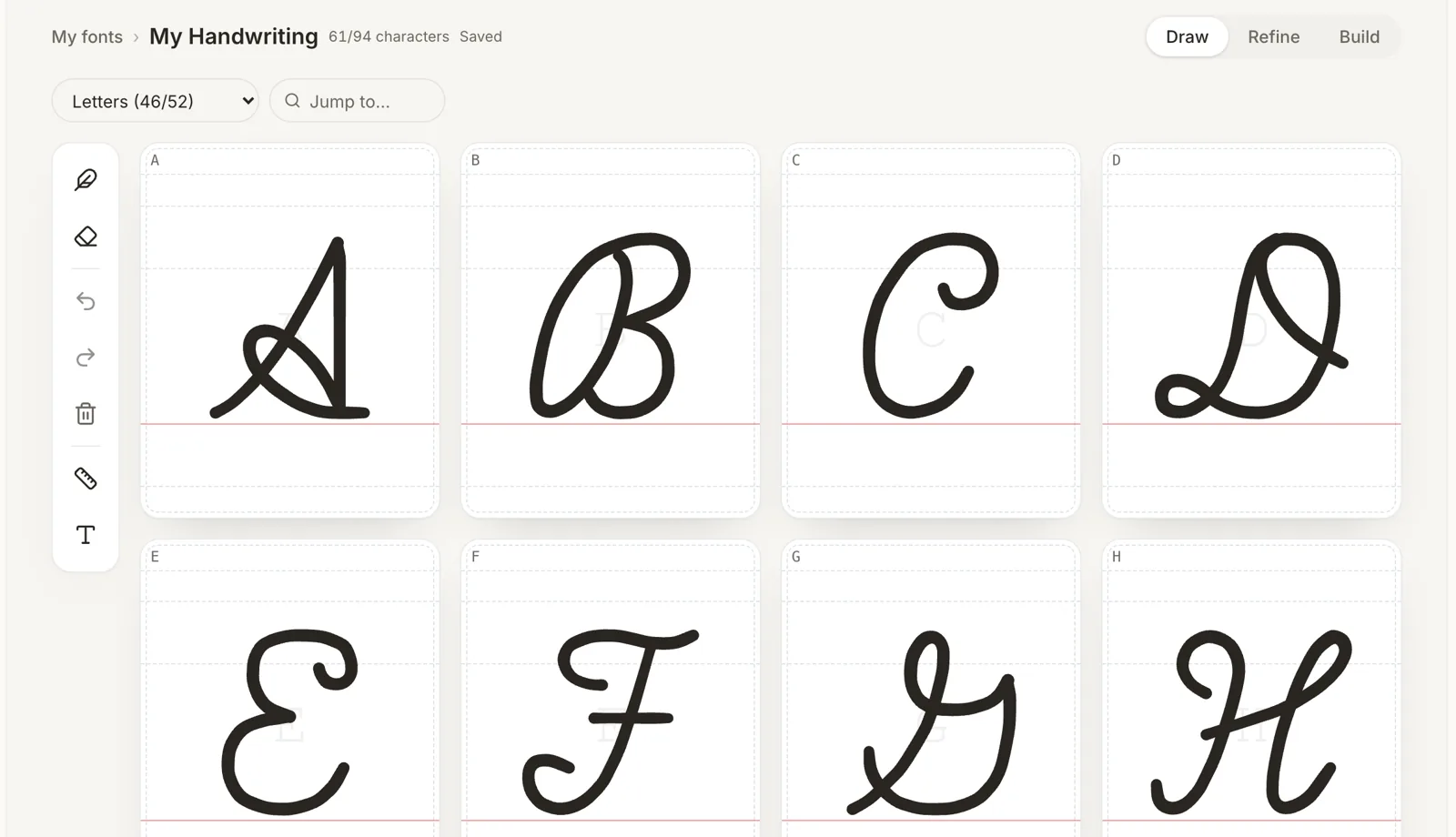
HandFonty's Draw workspace: write each character directly inside its guided cell.
There is no template capture between drawing and editing. If an a looks too narrow, you can redraw that character in the same workspace. If the word Handwriting feels uneven, adjust the relevant characters and preview the word again.
HandFonty offers pen, marker and fountain-nib brushes, with brush and smoothing features depending on the plan. Pressure and palm rejection are supported, although the experience depends on your device, stylus and browser.
HandFonty's current workflow is direct drawing. Uploading a photograph or scan of existing handwriting is on the roadmap; this comparison does not count it as an available feature. See our image-to-font guide for that distinction.
Workflow map
CALLIGRAPHR — standard paper workflow

Choose characters
        ↓
Download and fill a template
        ↓
Scan or photograph → Upload
        ↓
Edit characters → Preview → Export


HANDFONTY — direct browser drawing

Choose characters
        ↓
Draw in guided browser cells
        ↓
Refine → Preview → Export
Workflow illustration: this describes the documented steps, not measured completion times.
Which tool gives you more control over your font?
Spacing matters as much as the shape of a letter
A good-looking alphabet can still feel awkward when you type a sentence. Wide characters, narrow characters and letters with overhangs need different amounts of space.
HandFonty's Refine step lets you adjust space before and after each character, vertical position, scale and global letter spacing. Neighbouring letters help you judge the rhythm in context.
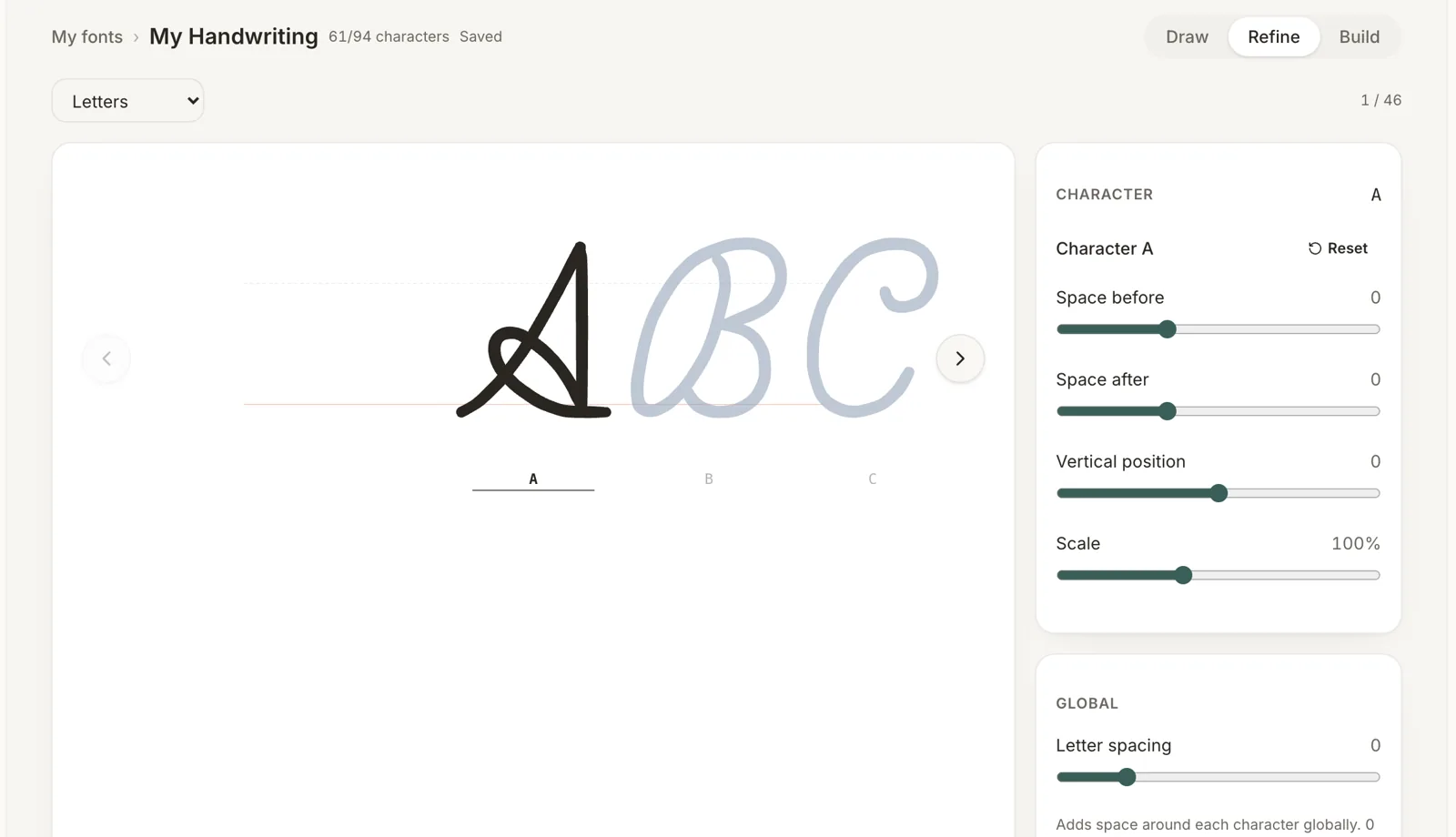
HandFonty keeps neighbouring characters visible while you adjust individual spacing, position and scale.
Calligraphr also supports baseline and size adjustments after scanning. Its individual letter-spacing adjustment is a Pro feature. The official FAQ explains how unwanted dots from a scan can expand a character's apparent width and how the image editor can remove those artifacts.
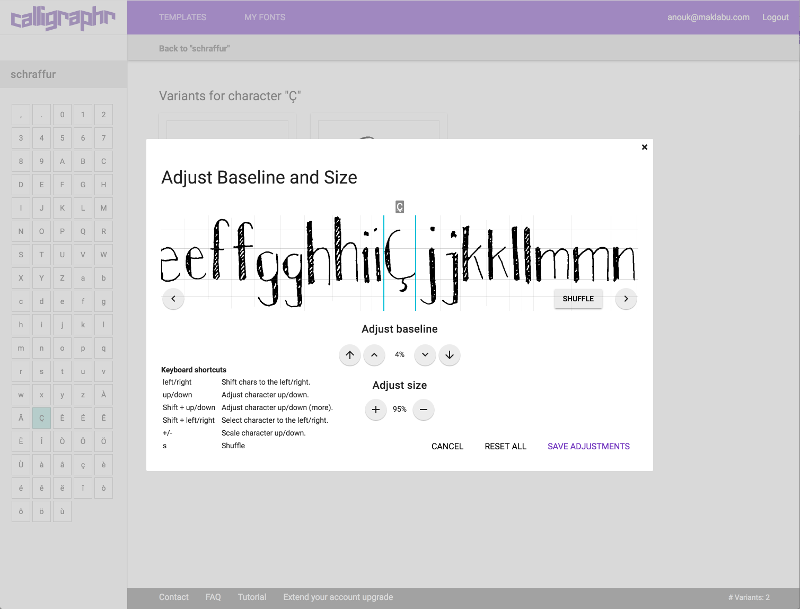
Calligraphr's baseline and size editor for uploaded letterforms. Screenshot: Calligraphr's official website.
Choose direct drawing if you want to redraw and adjust a letter in one workspace. Choose template capture if your preferred starting point is a character written with a physical pen.
Variants make repeated letters less uniform
When you write letter by hand, the two t characters will probably differ slightly. Character variants let a font reproduce some of that variation.
HandFonty supports up to three designs per character as a Pro feature. Calligraphr allows up to two variants on its Free plan and fifteen on Pro. Calligraphr has the higher documented variant limit, which matters if you want to build many alternates for the same letter.
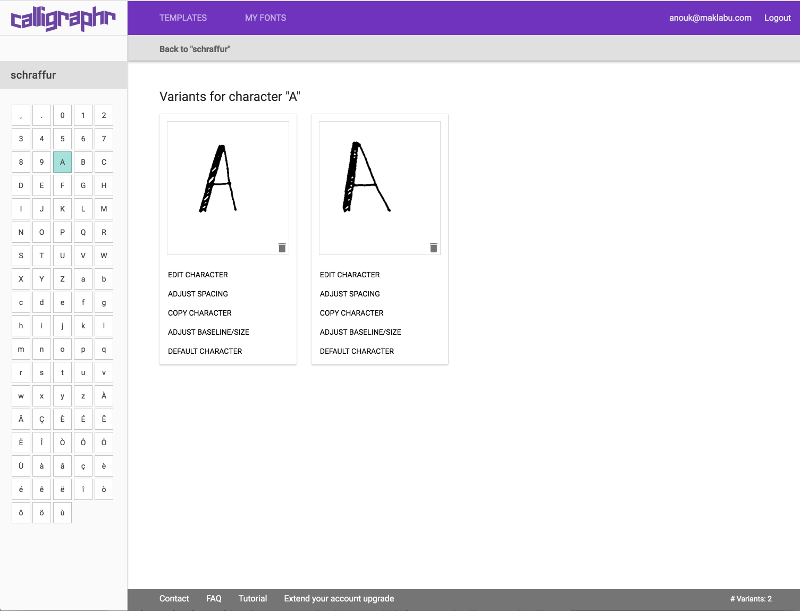
Two designs of the same character in Calligraphr's example project. Screenshot: Calligraphr's official website.
The font's destination app matters too. Contextual alternates and ligatures depend on OpenType support and may need to be enabled in the application. A preview in a font maker does not guarantee that every app will display those features automatically.
Ligatures help with specific connected combinations
A ligature is a drawing for a sequence such as fi or th. Both products offer ligatures in their paid feature sets.
Separate characters          Ligature

f + i                        one drawing for “fi”
t + h                        one drawing for “th”

Single design                Character variants

one “a” repeated             several drawings of “a”
Typography illustration: ligatures combine a sequence; variants provide alternate designs for one character.
Ligatures can improve particular joins, but they do not automatically solve every connection in a cursive font. You still need consistent joining heights, compatible letter shapes and suitable spacing.
TTF and OTF are available in both products
HandFonty and Calligraphr export standard TTF and OTF font files. Format support alone is not a reason to choose one over the other.
You can install the downloaded files on macOS or Windows and use them in applications that support installed custom fonts. Browser-based editors, mobile apps and hosted design tools may impose their own font-upload rules.
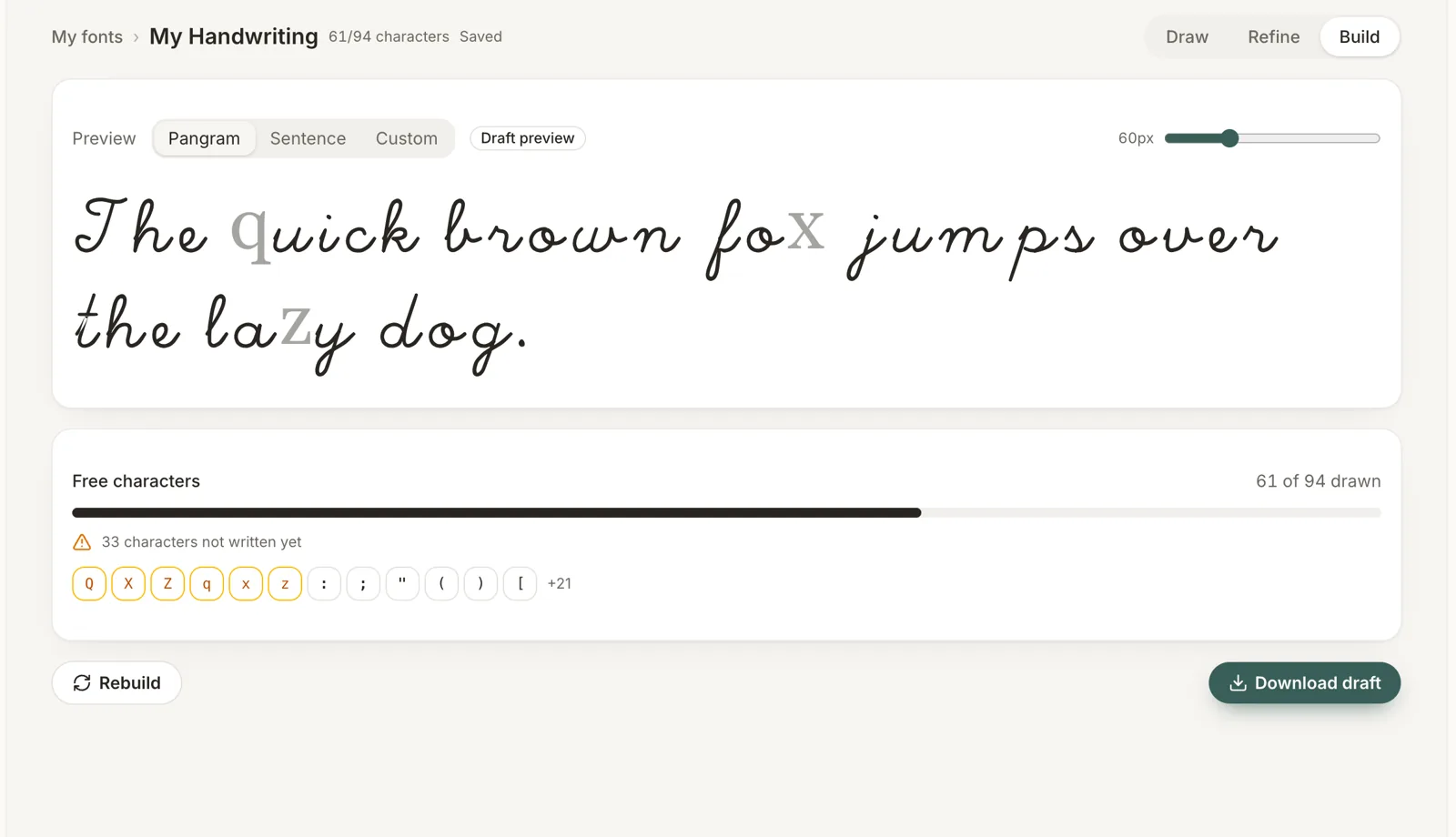
HandFonty's Build workspace previews your text and lists missing characters. This example is incomplete, so the download is marked as a draft.
WOFF2 is listed as coming soon on HandFonty's pricing page. It is not included as a current export advantage here.
Calligraphr vs HandFonty: free plans and pricing
What can you do for free?
HandFonty Free includes one handwriting font, letters, numbers and basic punctuation, with TTF and OTF export. Its current pricing page describes the free plan as personal use.
Calligraphr Free allows one font project at a time, a maximum of 75 characters per font and up to two variants per character. The pricing page lists unlimited fonts overall, so the one-project limit should not be confused with a lifetime limit of one exported font. Ligatures and individual character spacing require Pro.
There is a meaningful licence difference: Calligraphr's official FAQ says fonts you create are your property and may be used commercially. HandFonty's current pricing page includes a commercial licence with a Pro Font unlock or active Studio plan.
If you only need a small font for a paid project, compare that licensing difference before choosing a free plan.
How HandFonty's paid plans work
| HandFonty plan | Listed price in USD | What the payment unlocks |
|---|---|---|
| Pro Font | $5.99 once | Permanent Pro unlock for one font |
| Pro Font ×3 | $14.99 once | Three font unlocks; unused credits do not expire |
| Pro Font ×5 | $19.99 once | Five font unlocks; unused credits do not expire |
| Studio Monthly | $8.99/month | Unlimited Pro font access while subscribed |
| Studio Yearly | $59/year | Unlimited Pro font access while subscribed; annual billing |
For an occasional maker, the single-font unlock is straightforward: upgrade the font you want to keep developing. For multiple projects, packs or Studio may fit better.
The annual Studio plan is approximately $4.92 per month when averaged across the year, billed as $59 annually. A permanent Pro Font unlock and subscription access are different purchases; Studio does not permanently unlock every project.
How Calligraphr Pro works
Calligraphr offers time-limited Pro access, with either a one-time payment or recurring subscription payments. Its one-time upgrade is not a permanent per-font unlock.
At the October 26, 2026 check, its public pricing page displayed CNY ¥60 for one month, or CNY ¥40 per month for a six-month upgrade. Those are the prices displayed in our browsing session, not a verified USD quote. Check the Calligraphr pricing page for the currency and final price shown to you; this article does not make a numerical savings claim across currencies.
Pro raises the documented limits to 20 simultaneous projects, 600 characters per font and 15 variants per character, and adds ligatures, individual character spacing, server storage and backup.
Both products let you keep using downloaded fonts after paid access ends. The distinction is ongoing editor access and project features, not whether an already downloaded font stops working. Calligraphr's FAQ also distinguishes downloaded font files from its server-side project storage, which is removed when the upgrade expires.
Which Calligraphr alternative is right for you?
| Your situation | Better fit to try first | Why |
|---|---|---|
| You want to write with a stylus directly in a browser | HandFonty | Drawing and refinement happen in the same workflow |
| You prefer a physical pen, brush and paper | Calligraphr | Its documented capture process is built around a filled template |
| You want a permanent Pro unlock for one specific font | HandFonty Pro Font | One-time payment tied to that font |
| You want more than three variants of individual letters | Calligraphr Pro | Supports up to fifteen variants per character |
| You need commercial use on a free plan | Calligraphr | Its official FAQ permits commercial use of user-created fonts |
| You frequently redraw individual letter shapes | HandFonty | You can draw the replacement directly |
| You already have a Calligraphr project that works well | Calligraphr | Staying avoids recreating your letters in another workflow |
For an iPad or other pen-enabled tablet, HandFonty is worth trying if your priority is drawing on the screen itself. That is a workflow recommendation, not a claim that Calligraphr cannot be used from a tablet.
If you have an existing Calligraphr project, switching to HandFonty currently means drawing your characters there. This article does not promise automatic project import or scan conversion.
A practical way to decide
Try the same small set of characters in both tools: a, e, g, n, t, H, and a few digits. Preview a word containing repeats, such as letter, along with the exact text you plan to use.
Compare the drawing experience, the work needed to fix one character, and the result in your destination app. This small trial is more useful than choosing a tool solely because it has the longest feature list.
Start your first HandFonty font free, or compare HandFonty's paid plans if you need commercial use, ligatures or variants.
Frequently asked questions
What is a good Calligraphr alternative for direct browser drawing?
HandFonty is an option for drawing characters directly in a browser with a mouse, finger or stylus. It includes guided cells, a spacing refinement step and TTF/OTF export. Its main distinction from Calligraphr is direct drawing rather than a template-image upload workflow.
Is HandFonty free?
Yes. HandFonty's current Free plan includes one handwriting font, basic letters, numbers and punctuation, and TTF/OTF export for personal use. Advanced features and commercial licensing are included with Pro Font or Studio.
Do I need a scanner to use Calligraphr?
No. Calligraphr supports photographed templates as well as scans. Its official FAQ says a modern smartphone camera can give good results with even lighting and all four template corner markers visible.
Does Calligraphr only offer subscriptions?
No. Calligraphr offers one-time payments for a limited Pro upgrade period as well as recurring subscriptions. That differs from HandFonty's permanent Pro unlock for an individual font.
Can I use fonts from either tool commercially?
Calligraphr's official FAQ permits commercial use of the fonts you create. HandFonty's current pricing page specifies personal use for Free and includes a commercial licence with a Pro Font unlock or active Studio subscription.
Will my downloaded fonts stop working when a subscription ends?
No. Both products say downloaded standard font files remain usable after paid access ends. Access to advanced editing, new exports and cloud project features depends on the product and plan.
Can HandFonty convert a scanned handwriting sheet today?
Photo and scan conversion is on HandFonty's roadmap. Its available workflow is drawing characters directly in the browser. Use a tool with current template-image input if scan conversion is essential to your project.
Which tool supports more character variants?
Calligraphr Pro supports up to fifteen variants per character, compared with HandFonty's up to three. Calligraphr Free supports up to two. Variants and ligatures may require OpenType features to be enabled in the app where you use the exported font.
Sources and fact-checking
Product features, prices and plan terms were checked on October 26, 2026. Recheck pricing and licensing before purchasing.
- Calligraphr features — output formats, character randomization, ligatures, templates and editing after scanning.
- Calligraphr pricing — free and Pro limits, payment options and downloaded-font independence.
- Calligraphr first-font tutorial — template, print, scan/photo, upload and build workflow.
- Calligraphr FAQ — photography guidance, commercial use, project storage and OpenType compatibility.
- HandFonty homepage — direct drawing, refinement, brushes, variants and export workflow.
- HandFonty pricing — free plan, permanent per-font unlocks, packs, Studio and commercial licensing.
- HandFonty image-to-font guide — distinction between current drawing features and planned photo/scan conversion.
The FontCraft comparison was an editorial reference for organizing a workflow-based comparison. Competitor facts in this article were checked against Calligraphr's own pages.
Screenshot credits: HandFonty product screenshots are from our own product materials. Calligraphr screenshots are the example interface images supplied on its official homepage, reproduced here to illustrate the comparison. The cover combines screenshots of both products.